
 site
site contact
 history
 index
indexdanaus@bananapif3
-----------------
█ █ █ █ █ █ █ █ █ █ █ OS: Armbian (24.5.0-trunk) riscv64
███████████████████████ Host: spacemit k1-x deb1 board
▄▄██ ██▄▄ Kernel: 6.1.15-legacy-k1
▄▄██ ███████████ ██▄▄ Uptime: 6 mins
▄▄██ ██ ██ ██▄▄ Packages: 1292 (dpkg)
▄▄██ ██ ██ ██▄▄ Shell: bash 5.2.15
▄▄██ ██ ██ ██▄▄ Resolution: 1680x1050
▄▄██ █████████████ ██▄▄ DE: GNOME 45.2
▄▄██ ██ ██ ██▄▄ WM: Mutter
▄▄██ ██ ██ ██▄▄ WM Theme: Adwaita
▄▄██ ██ ██ ██▄▄ Theme: Flat-Remix-GTK-Light-Solid [GTK2/3]
▄▄██ ██▄▄ Icons: Flat-Remix-Green-Light [GTK2/3]
███████████████████████ Terminal: x-terminal-emul
█ █ █ █ █ █ █ █ █ █ █ CPU: Spacemit X60 (8) @ 1.600GHz
Memory: 652MiB / 3805MiB
Creating a compiler for retro part 2: Working with the agent
April 07, 2026 —
Andres H
Every time you start a project, there’s that spark that ignites something deep inside you. It usually fades as you move forward.
After creating that big waterfall list of tasks, I started using the Jules agent. I immediately noticed how painfully slow it was. At the time, Gemini 2.5 was the default for the 15 free tasks, but it had a nice feature: you could see the VM output and what the AI was trying to do, so you could step in and help guide it.
Before anyone starts pointing out what I could have done better, remember this: I was experimenting. I wanted to learn firsthand how to properly direct an agent. Every new model changes the way you need to interact with it, so I chose to stay in interactive mode instead of auto-planning—even after Gemini 2.5 was deprecated and Gemini 3 Flash became the default.
I struggled a lot — not just with the slow performance, but with the AI’s erratic behavior. Even with proper context, it would sometimes act unpredictably. It felt like it had multiple personalities: in its (now removed) “thinking” traces, it would contradict itself, produce bizarre code reviews, or create useless branches with zero changes.
To my surprise, Jules struggled with very simple and repetitive refactors. Sometimes it even complained that the task was too manual and asked if it could do something else instead. That got frustrating.
But realistically, I couldn’t complain too much. It was doing work I didn’t have time to do—writing C++98 code under tight constraints. And to its credit, it helped keep things consistent. Left on my own, I would have been tempted to use modern features instead of sticking to things like manual dynamic arrays.
At the start of each task, it always asked questions. Some felt like filler or basic confirmation, but others were surprisingly precise and forced me to think more carefully about the problem.
There were also some funny moments. For example, I once explained how to use git reset --hard, and it ended up in an infinite loop—making changes, resetting, and repeating: “I made a mistake, I need to start again.”
Refactoring in a growing codebase is unavoidable. If you trust an agent to handle it, be prepared to review everything carefully. Blind trust will burn you.
Another major pain point was the code review tool Jules used. When it worked, it was helpful. But when Jules failed to address it, it failed hard. Several times, after receiving a code review, the agent would lose context, reset its workspace, and commit “solutions” based on hallucinated changes without implementing the actual requested work. I had to restart tasks multiple times because of this.
One key lesson I learned was the importance of scope. The agent didn’t really improve by having more context in its "memories" it had a capability ceiling. To get good results, I had to narrow the scope aggressively or split tasks into much smaller pieces.
A good example was making the parser non-copyable again. I had experimented with a copyable parser for a while, which led to subtle and messy segmentation faults in C++ due to pointer arithmetic and type coercion issues. Fixing that required breaking the problem into many smaller tasks.
After a dozen failed attempts, I created a Markdown “guide” file to track refactors. I would define exactly what needed to be done, execute tasks one by one, mark them as complete, and repeat the process.
Running tests after each change is usually a good practice except when you expect massive regressions, like during architectural shifts (for example, when I introduced the AST lifter). In those cases, I had to be extremely explicit and keep tasks short. Otherwise, the AI would run the test suite, detect failures (which was expected), and then try to fix everything—never finishing because the system was intentionally unstable. That’s where I had to step in manually.
When it came to regression fixing, the AI could help—but its fixes were often just duct tape. Lots of duct tape. Eventually, I had to step back, review the whole system, and design proper fixes instead of patching symptoms.
And yes—there is still a lot of duct tape in the codebase. At some point, I had to stop accepting the “easy” solutions and push for proper implementations, even if that meant spending multiple tasks on a single change.
One advantage, though, was speed in experimentation. I could run parallel “spike” tasks—trying different approaches and comparing results. That helped identify cleaner solutions with fewer regressions. This is where having good tests really paid off.
For the core components (lexer, parser, type checker, and backend emitter), I relied heavily on TDD. I prefer writing accurate tests first rather than realizing later that a test wasn’t actually verifying anything useful. For example, I once failed to properly define how catch and orelse expressions should be evaluated (LHS vs RHS), and the issue went unnoticed until very late. Fixing it required updating tests and refactoring accordingly. The AI tried to “fix” the tests incorrectly a few times, but those mistakes were easy to catch.
As for hallucinations, most of them were caught either during code review or by tests. Since I was building foundational components with relatively few dependencies, the damage was usually contained.
Code repetition is definitely present. For example, the FNV-1a hash function appears multiple times in the codebase. Every time the AI needed hashing, it reimplemented it instead of reusing existing code. I still need to clean that up—but it’s not critical right now.
Will I continue using it? Maybe. It helped, but let’s be clear: it’s not magic. This wasn’t a case of writing “build a Zig compiler for Win98, no mistakes” and walking away. Not even close.
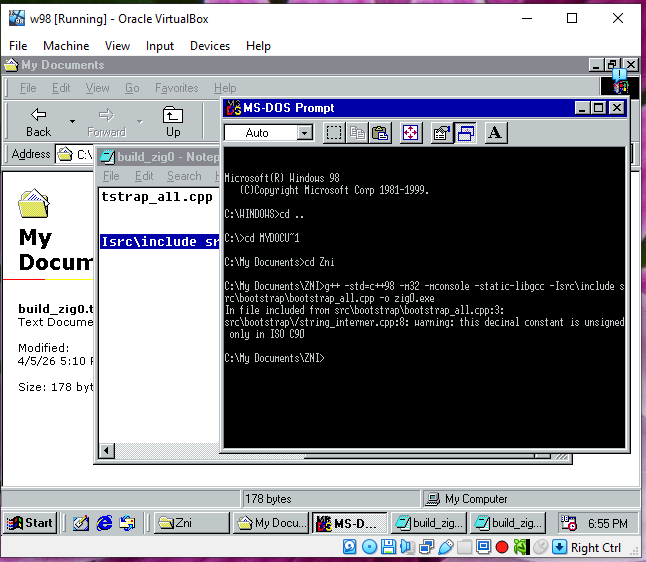
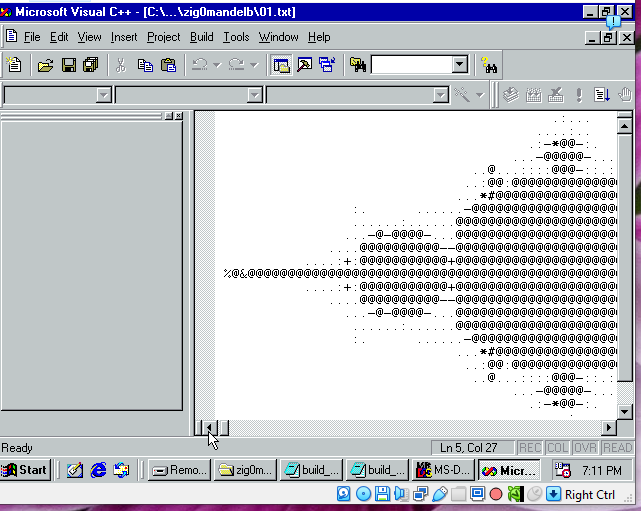
Was it worth it? Yes. My Windows 98 VM proves it.
Tags: z98, tech, compiler, zig, win98
Creating a compiler for retro, a nice experience
April 06, 2026 —
Andres H
It feels like ages since I last wrote something. A lot has changed in my life, yet I feel very refreshed writing here again.
I don’t want to turn this into a dramatic story, so I’ll get straight to the point. Since 2025, I’ve been working on a new and exciting project—something I’ve wanted to build my whole life: a compiler.
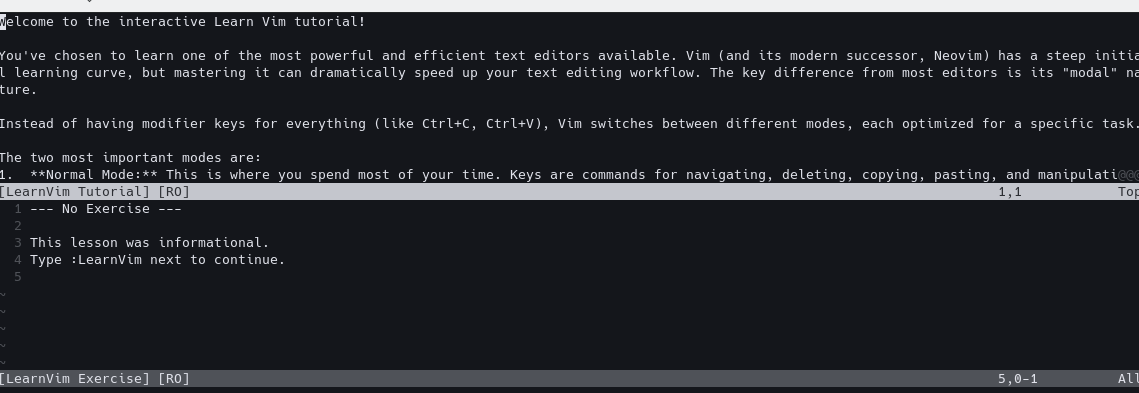
Sometime last year, I started experimenting just for fun with an AI agent (Jules) using its free tier. I built a plugin for learning Neovim (nvim), which was an interesting experience on its own.
After that, I got that familiar itch—you can use these tools to build the side projects you’ve always wanted to try, or at least sketch your ideas. The Neovim plugin wasn’t a hit in terms of downloads, but the idea came to life without me having to deal with the UI parts I don’t enjoy. https://github.com/melkyr/learn-vim
Then I tried something more experimental, just for fun—building a CMS using Go and HTMX to render websites like static pages (an old idea I’ve always liked). I love tools like that; they remind me of the “good old days.” I’ve spent a lot of time chasing that feeling—when static HTML sites were common, and even though limited RAM made things slower, it didn’t really matter. After building and modifying this shell CMS, I started thinking: “This might be the time to try my silly idea.”
In November 2025, I committed to creating a compiler as a personal goal. I’m not interested in creating a new language (at least not right now); I wanted the experience of building that small application that produces another application—the kind of thing that puts food on my table every day.
Then came a lot of head-scratching: which language should I “remake” a compiler for? Which one would be useful—or at least fun? With limited time, I needed a project that wouldn’t feel like a race or a burden.
I didn’t want to build yet another C# or Java compiler and compete in a crowded space. I wanted something I could work on quietly—something no one expects, and that could emerge from the shadows as an “unnecessary” tool.
The thing is, as engineers, we often dream about building something just for the sake of it—no clear goal, just curiosity and fun. And there I was, still trying to rationalize the pros and cons of targeting different platforms.
Then it hit me: I don’t want to build a tool for people—I want to build a tool for fun. So I decided to remove that pressure and pick something I genuinely liked. A retro platform. No active support, documentation already “finished,” and the outcome doesn’t matter anymore—it already belongs to the past. I chose Windows 98 as my target platform.
The next answer came immediately. After locking myself into Win98, I could quickly check what had or hadn’t been built for it. I came across an article about making Rust (a modern language) work on Windows 95: https://seri.tools/blog/announcing-rust9x/. Even now, they’ve managed to make a toolchain that outputs Rust apps for Win9x—that’s impressive.
But for my compiler, I wanted something different. I wanted a retro compiler with era-accurate limitations. That meant no LLVM, no ANTLR, and operating under tight resource constraints—targeting machines with 16MB or 32MB of RAM.
With those constraints, it became clear I needed a low-level language, giving users full control and responsibility for optimization.
With Rust already “working” thanks to the Rust9x project, I thought: “Let’s try Zig.” A silly idea at first glance—if you look at Zig’s feature set, replicating that in the Windows 98 era feels like something only someone from the future could do.
With Zig as the target language and Windows 98 as the platform, the next big question was: how? If I wanted time accuracy and minimal dependencies, I had to rely heavily on native OS features—and if you lived through that era, you know Windows 98 wasn’t exactly reliable.
Big decisions had to be made: how to build it, what dependencies to allow, and how much complexity to tolerate. The project started, as many do, with a developer thinking too much.
Then I remembered how portable software used to be—just copy an .exe file and run it. No dependencies, no setup. That became my goal.
I decided the compiler had to be buildable using tools available on the target OS itself. If Windows 98 is the minimum, then everything must be based on what was available at the time—again, era-accurate.
That left me with options like Fortran, C++, C, Delphi, and BASIC (yes, really). There was also some Python for Win9x, but I discarded it due to resource constraints. I had to consider limitations like the 1MB stack on Windows 98. Delphi was proprietary, which I wanted to avoid. C was a strong option but very manual. BASIC… not that much torture. So I committed to another kind of pain: C++—specifically C++98.
As for execution, that’s where Jules came in. I guided it with structured plans while designing everything as if I had unlimited time. A classic waterfall approach: tasks building on top of each other toward the final goal—a bootstrap compiler.
Yes, AI has its issues—hallucinations, weak context handling, inconsistent quality. I’ve experienced all of them. But I decided to use it for what it’s good at: generating the bootstrap compiler—the basic building block, a one-time-use tool. A perfect use case for AI.
So the journey began. Initially, I planned to output assembly for maximum performance, but later I switched to generating C89 for portability and easier debugging.
I also had to give up many rich language features due to the platform’s limitations. If I support them in the future, it will be in the self-hosted compiler—not the bootstrap version. Still, I pushed to make the first step as capable as possible.
So how did it go?
Well… six long months later: https://github.com/melkyr/znineeight
The bootstrap compiler is alive. It works. That’s everything I want to say for now—more details coming in the next days and weeks.
Tags: programming, general, retro, win98
Neovim Plugin for learning purposes, my two cents
April 25, 2025 —
Andres H
I am not afraid of admiting that I have tried several times to learn vim but with no success, yes, I know you will say, please try this or this watch this tutorial or this...
And yeah really I gave several tries to different strategies, I have bought even a book, yes for an editor!! a book.
Even worse, I have tried to code using it and found myself really trying hard, just for fun, and believe me I have gotten some results, following the book's advice is amazing. But I found myself getting stuck and that's on my side, not the book's fault.
Every once in a while I found myself struggling coming with ideas to test things that I learn. And again yes, I am very aware that to be able to learn applying things and attempting projects is the best way rather than going on tutorial hell.
But, I just can't. I am usually dry of ideas to try to do things, like to learn new things, usually either I do the same project again and again and again, or just give up. Why? I think it is related to myself beign unable to produce new things.
Surprisingly every century or more I got a flash or an epiphany of inspiration and get my hands on something I REALLY want to try, like when I wanted to improve this editor (shellcms). Or as in the past post I got involved into creating a tool like for splitting text in chapters and creating a novel splitter static site generator.
This time, I decided to address that struggle learning vim, I like vimtutor but I found it sometimes a little difficult to follow and finding the time to just reopen it and go to the part that you were, I think that it was a little pain.
So really I decided to look for "tutorials", but most of them are outside of vim, and you will have to switch context every time, that is my real pain, switch context to look the book, come on! I want to test myself the thing and get in "pace" to be learning and having fun.
To practice I want straight-forward examples or things to try, and REAL CODE not just random text.
After all my complains I decided not to complain anymore and really put the effort, and create just the thing myself.
So guess what? I found myself doing or redoing a tutorial, but not outside vim.
I ended using neovim because I wanted to avoid vimscript really. But Lua is a great language and a simple one for this.
And in this era of AI, it couldn't be easier to just create a new plugin for a platform using a foreign language for you (I usually use c# not lua)
Here is the result Github 13 modules of pure just excercises you can check verify, reset try again and solves all, short things to do, very clear instructions, no creativity to do extra things, if I want another excercise I can just write it and try it.
Tags: vim
Upgrading shellCMS to use either gum or dialog
April 25, 2025 —
Andres H
For some reason I've got caught lately on working on TUI's just for fun just to have this kind of interactivity that makes you learn how to use a tool when you are a total newcomer.
I did run a few experiments, and try to put some effort on creating a Tar and Systemctl tools, and I found those to be a little too overwelming so I decided to start simple and this app is the perfect target, not only I can edit it directly, but also I could explore some of the advantages of using an interactive tui, like when pressing enter after www/news post
And I have a lot of fun, I decided that to make things easier for users of shellcms_bulma I have to add the same interactivity but addressing all the moments where the console ask for an action.
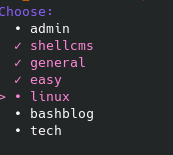
Guided by that then I conceptualized: first using both dialog and gum, yes I know gum requires dependencies and installing things, but it will autodetect your setup and if dialog is present and not gum it will use it, I just created two switches at the begining -i and -igum.
And with the refactors done to the code voltaire! now you can just use shellcms_b -i/-igum and you will be good to go.
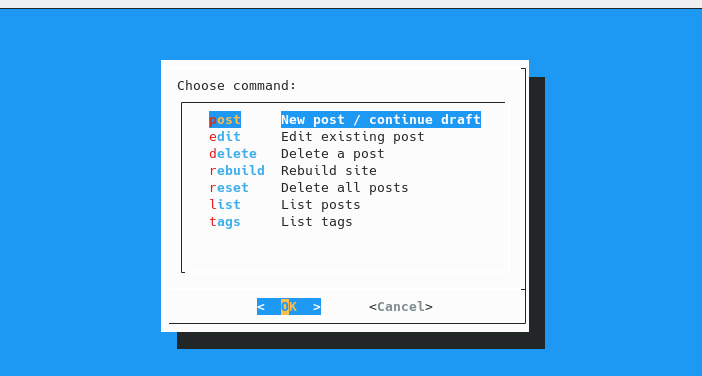
Results on gum could be polished further but really the feel is a little more modern.
Tags: shellcms_bulma
Updating shellcms_bulma
November 28, 2024 —
Andres H
Aha I am impressed that this day arrived, the day I had to refactor shellcms_b to start really doing my own path to improve things, maybe modularity, the idea of a single script is great as it is very portable but not sure if now onwards I will really like to keep my attention on managing just one big file and please don't get me wrong it just happens time to time that you maybe get used to small parts of code, Locality of Behaviour is great but some times it just lead to that kind of aging logic that is just if over if. So I decided to give it a try and just fix some bugs that my current implementation had lets have some fun or nightmares!.
Tags: shellcms_bulma
Refactoring tags ask function
November 28, 2024 —
Andres H
I know it is not exactly an improvement, and most of the refactor that I am doing involves just some times parsing $1 into local variables, and someone could say that this could hurt performance, but in this modern era maybe not that much, and really I prefer just to read local variables and even local functions to keep maybe a cleaner view (from today's standards) maybe others could tell me that this is not right but as a coder you are tempted to try things out as much as you can.
Tags: shellcms_bulma
Testing paginating the blog
November 28, 2024 —
Andres H
Yes, I know maybe it is not the proper way to do things as really you don't need to paginate a static html site, with the "view more posts" link you should be able to just go to your desired post, or even better just search inside the website using the search box, but just a new idea let's try it, maybe I could just paginate every 5 posts, this could lead to a lot of extrafiles, but at the end of the day they are pretty small. So lets try them out.
Tags: shellcms_bulma
Removing bug when grouping tags in shellcms_b
November 28, 2024 —
Andres H
Oh I feel bad for myself in this, I was testing the refactor and boom! I've found a weird bug, tag page was being built with just the last post oh, what an oversight, so I had to check it, but in the meanwhile I had to refactor the rebuild_tags function as it again was too long and I can't take in my mind all the things going on when rebuilding a tag(yes, maybe this is a skill issue on my side), but I can't avoid doing that while working in code. Now tags are properly working and even some weird behavior when reparsing home button in pages is fixed.
Tags: shellcms_bulma
Refactoring shellCMS_b create_html_page function
November 28, 2024 —
Andres H
Hence I wanted to start small but with the core function in mind, I just decided to refactor the processing of html page, with the new version my point was to split the page creation in its major parts header, body, footer and the postprocessing to link them back again properly. Now with this new version It will be easier (at least for me) to go through small pieces. Also there was a refactor in the tag_ pagination logic just to check better how the links for older pages are created.
Tags: shellcms_bulma
Experience Building Neovim in RiscV64 Banana Pi BPI-F3
September 21, 2024 —
Andres H
Hmm. It had been a while from my last post, but I received not too much time ago a riscv SBC. I was pretty excited, to just check it out but after testing out spacemiT bianbuOS I was dissapointed about the performance.
I decided to try and install terminal based code editor such as neovim/helix, but after apt-get returned no results for the architecture, I was pretty surprised but I thought (meh it has to be that at this moment that is not the focus). So I just decided "why not experiment building from source some fun stuff", so I tried to compile helix-editor as Rust was available for riscv, then when trying to compile hit a wall as kernel 6.1.15 had a nasty error and well had to be patched at kernel level, then I had to decide, should I continue? should I wait for a new kernel to be released? I chose the second.
Then while waiting (at the time of this blog post yet we are all waiting for kernel 6.6 to be released for this SBC) I decided to try a different editor, something maybe not that uncommon like and I jump ahead and tried to build Neovim
And as I stated before, I let the output of an attempt to install neovim from repository.
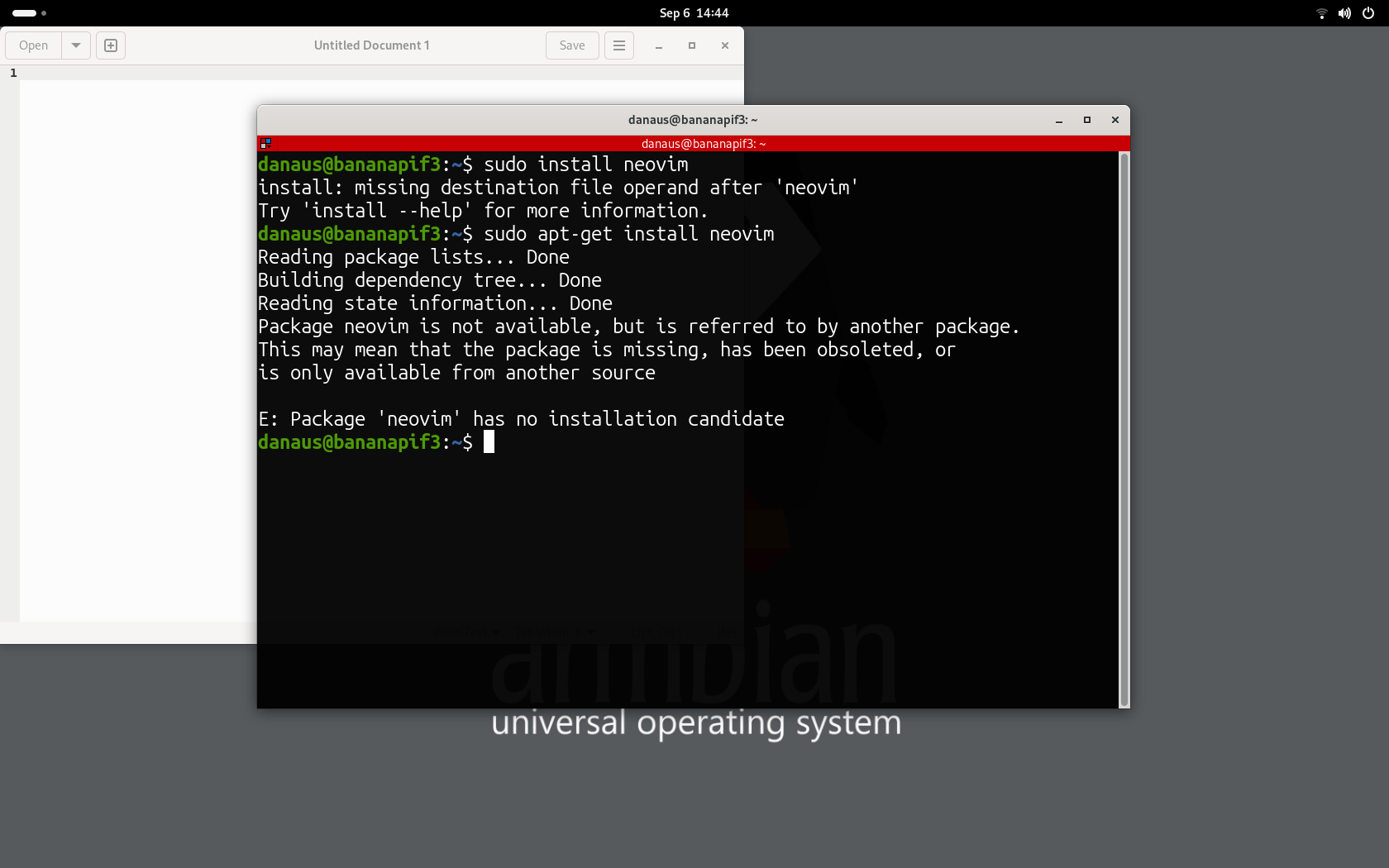
I went ahead to neovim's repo and selected 0.10 release and read the docs about building it.
First tried quick install so lets build prerequisites as the docs suggested:
sudo apt-get install ninja-build gettext cmake unzip curl build-essential
Then quickly continue on clonning the repo and try to make the installation.
But it was not able to complete. Here is the summary:
Quick inspection, and Eureka I needed some deps and use the manual installation with external dependencies (easy piece, right?). For Neovim version 0.10 I will need to install:
libuv libluv libvterm luajit lua-lpeg lua-mpack msgpack-c tree-sitter tree-sitter-c tree-sitter-lua tree-sitter-markdown tree-sitter-query tree-sitter-vim tree-sitter-vimdoc unibilium
Let's go ahead. And try to install most of things.
sudo apt-get install lua5.1
sudo apt-get install lua-luv lua-luv-dev
No issues, next install LuaJit
So as stated before it seems that there is no native riscv64 LuaJit then I cannot continue. Hmm pretty annoying. Checking the source of LuaJit yet riscv64 is not supported. I decided to search for a port of the library. And I was very very lucky that already there is one available here, just not easy to find.
Waiting a while gave me the following:
Then to check if my deps were helping me to progress in the build process I decided to try a compile on neovim again
Pretty rookie mistake Lua was missing but I am pretty sure I had installed, I soon realize that I had installed runtime instead of dev files.
sudo apt-get install liblua5.1-0-dev
Another try.
Yeah, dependencies completed. I crossed my fingers and then attemped the final build.
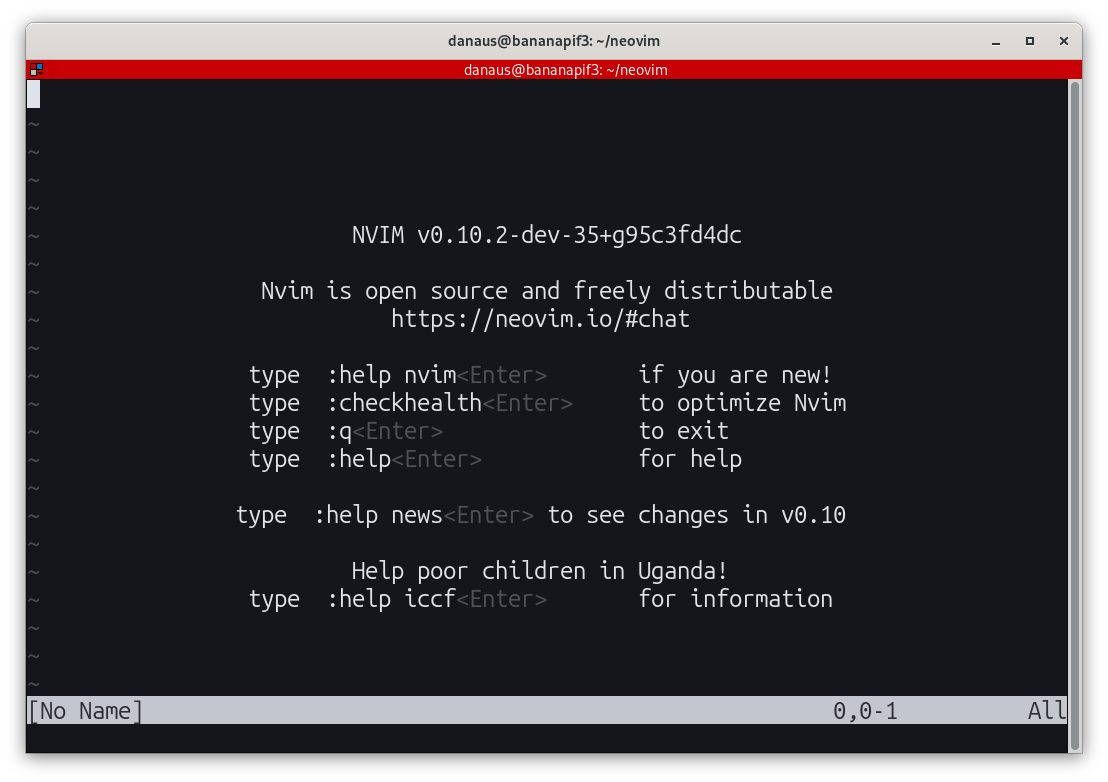
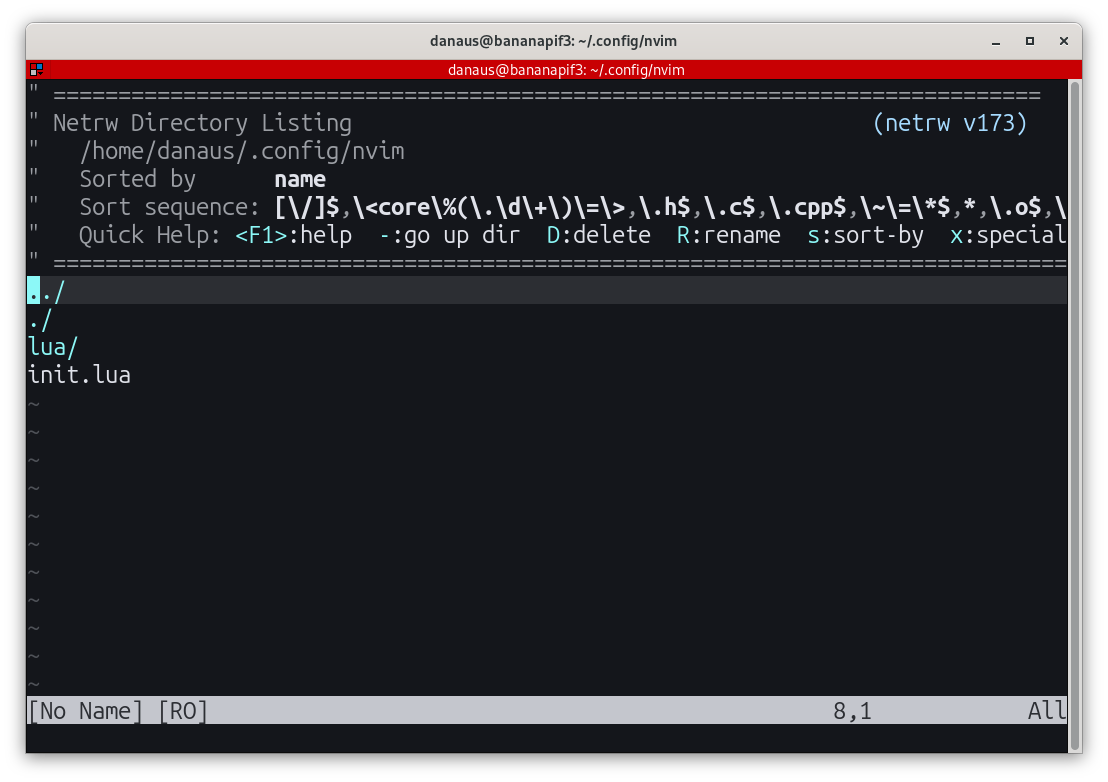
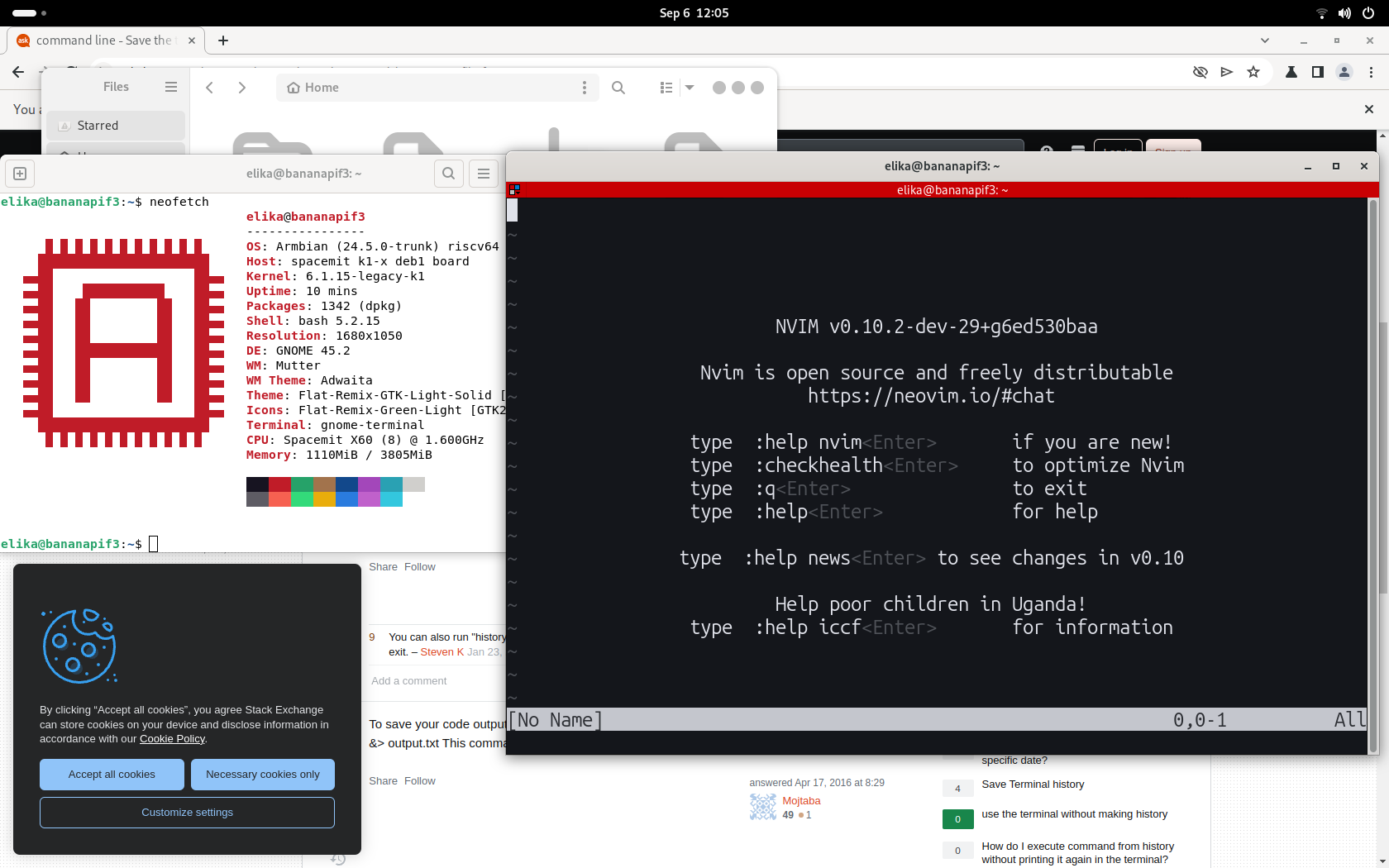
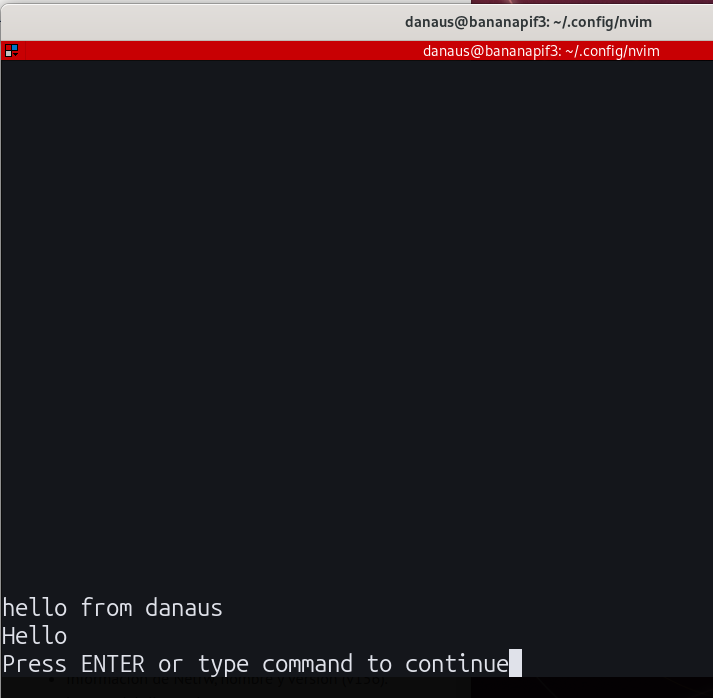
Even lua worked
Success!
Tags: tech
 rss
rss